



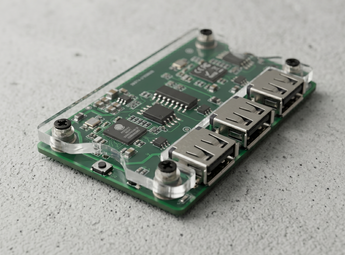


MAKCU
Couldn't load pickup availability
The MAKCU is a professional-grade dual-chip USB passthrough device designed to provide a 1:1 physical bridge between your peripherals and your gaming PC. Utilizing a sophisticated dual-ESP32-S3 architecture, the MAKCU captures, modifies, and injects input signals at the hardware level, ensuring your movements remain indistinguishable from legitimate play.
Dual-Chip Architecture: Powered by two high-speed ESP32-S3 microcontrollers working in synchronization, the MAKCU is a professional-grade USB passthrough device. This architecture creates a transparent bridge between your mouse and your PC, allowing for 1:1 hardware-level input modification with zero detectable software footprint.
True USB Passthrough: MAKCU acts as a physical bridge. Unlike traditional spoofers, it allows your gaming PC to communicate directly with your mouse or keyboard. This ensures you can still use official manufacturer software (like Logitech G HUB or Razer Synapse) to adjust DPI, RGB, and profiles while the device remains active.
4-Million Baud Rate Support: Engineered for elite precision, MAKCU supports an ultra-high 4,000,000 bps baud rate. While standard devices are limited by slower transmission speeds, MAKCU can transmit movement and click commands in approximately 42.5µs—well within a single 1ms USB poll—providing the smoothest, most responsive aim assist in the industry.
Web-Based Configuration: Manage your device with ease via the native MAKCU web interface. Update firmware, test inputs, and configure baud rates directly through any Chromium-based browser (Chrome/Edge), eliminating the need for suspicious third-party desktop configuration tools.
TECHNICAL SPECIFICATIONS
Processing Power
-
Microcontrollers: Dual ESP32-S3 (Independent Side-Processing)
-
Baud Rate: Dual Mode (115,200 or 4,000,000 bps)
-
Input Lag: Sub-millisecond (Physical 1kHz Polling)
Connectivity
-
Ports: 3x USB-C (Device, COM, Host)
-
Compatibility: PC, Console (Native M&K), and XIM Support
-
Device Memory: Pre-flashed for instant deployment
CONNECTIVITY & WORKFLOW
USB 1 - Device Port: Connects directly to your Gaming PC or Console. This is how the system "sees" your mouse/keyboard.
USB 2 - COM Port (Communication): Connects to your Secondary (Radar) PC. This port is the dedicated command line used by your DMA software to inject aim instructions without touching the gaming PC's USB bus.
USB 3 - Host Port: This is where your physical Mouse or Keyboard is plugged in. MAKCU captures the raw data from your device here before processing and passing it to the gaming PC.
- USB-A to USB-A Cable ×2
Requirements
This is a DMA product. What is DMA?
To use AIMBOT features, you need a HID.
To use ESP features, you need a FUSER.



